
0→1 · self-built product · 2026
SpotIt
An AI app that remembers where you put your things — so you never lose your keys, wallet, or passport again.
Role
Solo — product design + full-stack build
Year
2026
Platform
iOS · Flutter
Design
Figma — full design system
Build
Flutter · FastAPI · Supabase
AI
YOLO11 · semantic search · Gemini
The spark
I started from the capability, not the problem.
Vision models can now name almost everything in a photo on a phone-grade budget — YOLO for detection, CLIP for recognition, embeddings for “find me something like this.” The question that interested me wasn't whether we could, it was: what real, daily human problem does that actually solve?
The answer was almost too ordinary — where did I put my stuff? Everyone loses their keys, wallet, glasses, passport. It's universal, low-stakes on a good day and high-panic on the worst one, and no app had made object memory feel effortless.
The problem
Losing things is universal — and quietly stressful.
The cost isn't just the lost minutes. It's the low-grade anxiety of not knowing, the panic spike when you're already late, and the reflex to make someone else help you look.
Existing fixes don't fit. Bluetooth trackers only work on things you remembered to tag in advance; manual inventory apps ask you to do data entry on your own home. Both fail the exact moment you're in a hurry.
The bet
Don't make people tag things. Just remember for them.
SpotIt's bet is passive memory. You do quick room scans — a few seconds, like a panorama — and the app quietly detects and remembers what it saw and where. No tagging, no per-object setup.
I framed the whole product around one feeling: visual assurance. Open the app and you're reassured your things are accounted for; in a panic, you get an instant answer with photo proof.
The app's job isn't to find your keys. It's to make sure you never feel lost without them.
Design system
A calm system for an anxious moment.
Because the core emotion is mild anxiety, the design had to feel reassuring, not technical. I built a full system in Figma — color, type, motion, and an illustrated character — before writing a line of app code.
Deep Plum
#564787
Text · brand
Soft Gold
#E7C97F
CTAs · highlights
Soft Mint
#34D399
“Found it” success
Amber
#FBBF24
Low-confidence
Rose
#F43F5E
Errors · delete
Soft Lavender
#F5F3FF
Surfaces · cards
Typography
- Display
Varela Round
Rounded, friendly headlines & UI
- Body
Inter
Readable paragraphs & captions
- Accent
Tinos
Editorial, “zen” emphasis
Mood character

Peaceful

Searching

Found

Alert
One soft character changes mood with the app's state, so the system speaks emotionally, not just functionally. Built accessibility-first — Deep Plum on white clears 13.6:1, AAA.
Key flows
Scan once. Find instantly.
The surface is a five-tab app — Home, Map, Scan, Memory, Profile — built around one elevated action: Scan.
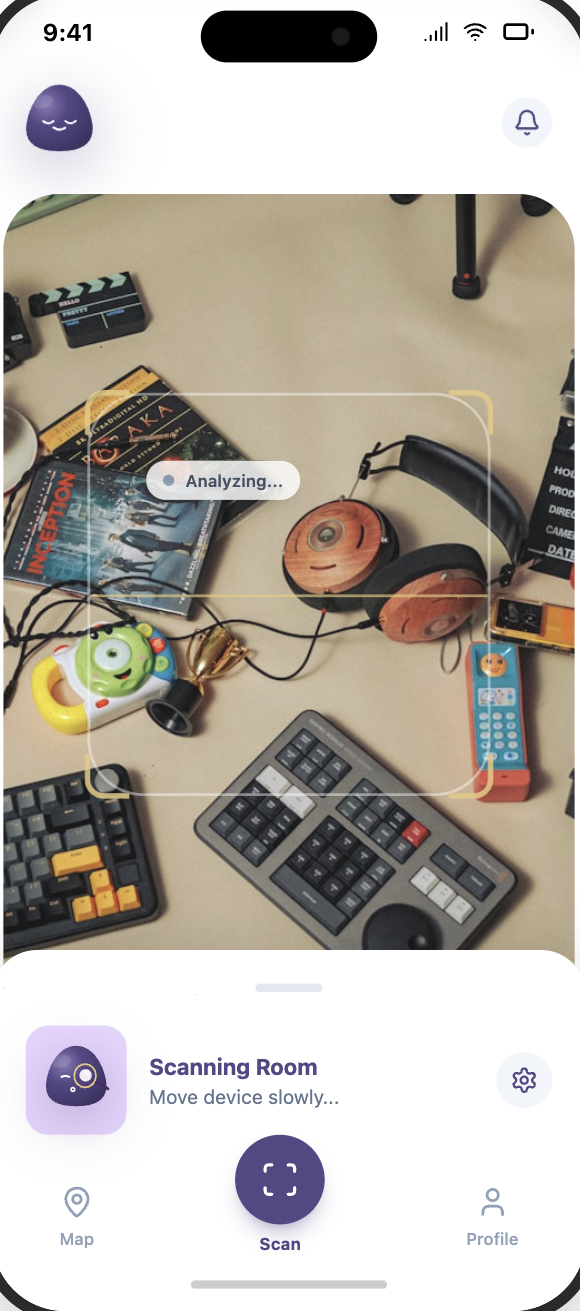
Scan a room
Pick a room, hold the camera up, and pan. A YOLO11 model detects everyday objects frame by frame; guided progress keeps it feeling effortless, not fiddly.
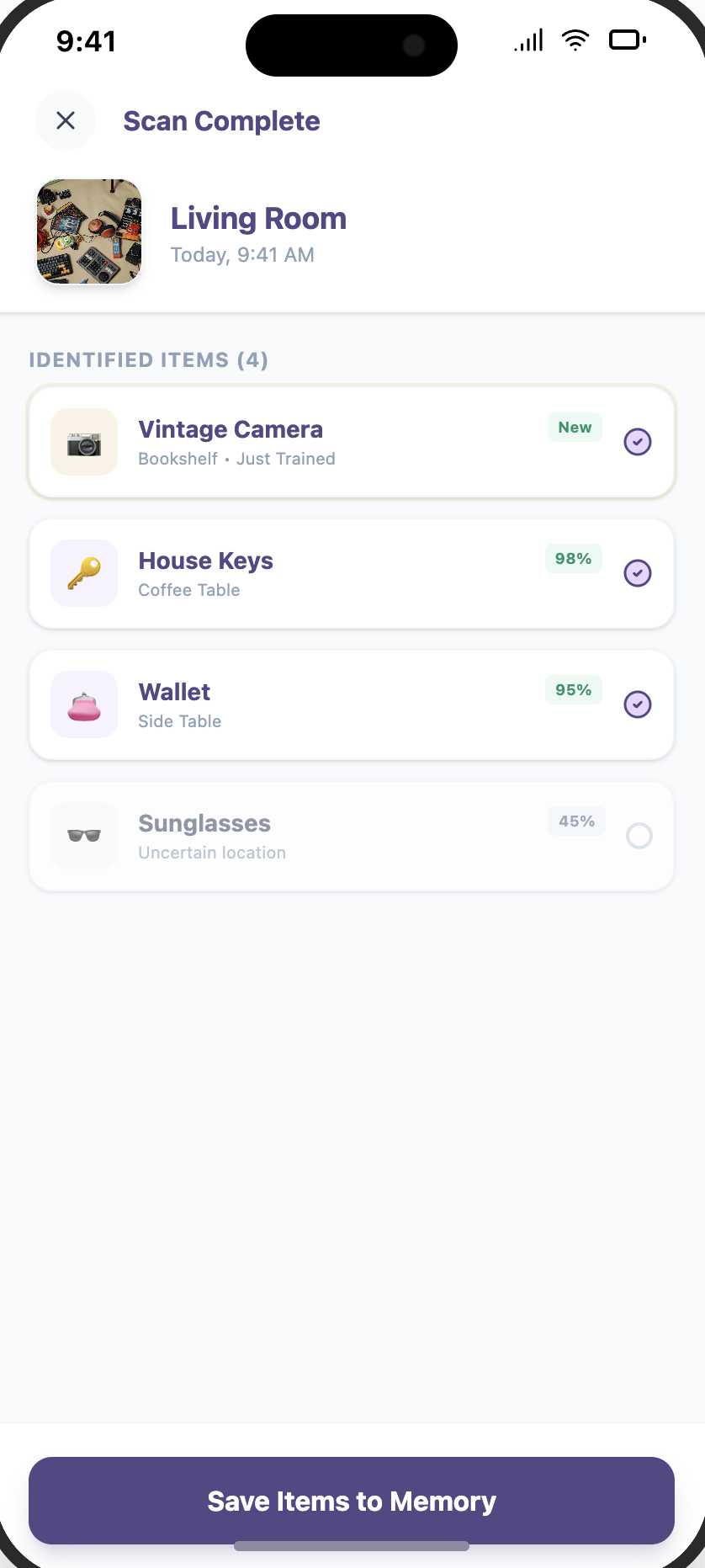
Detect & remember
Detected items surface with a confidence read — keys at 98%, wallet at 95%, an uncertain item flagged low. Known objects are remembered silently; anything unfamiliar can be taught with one tap.
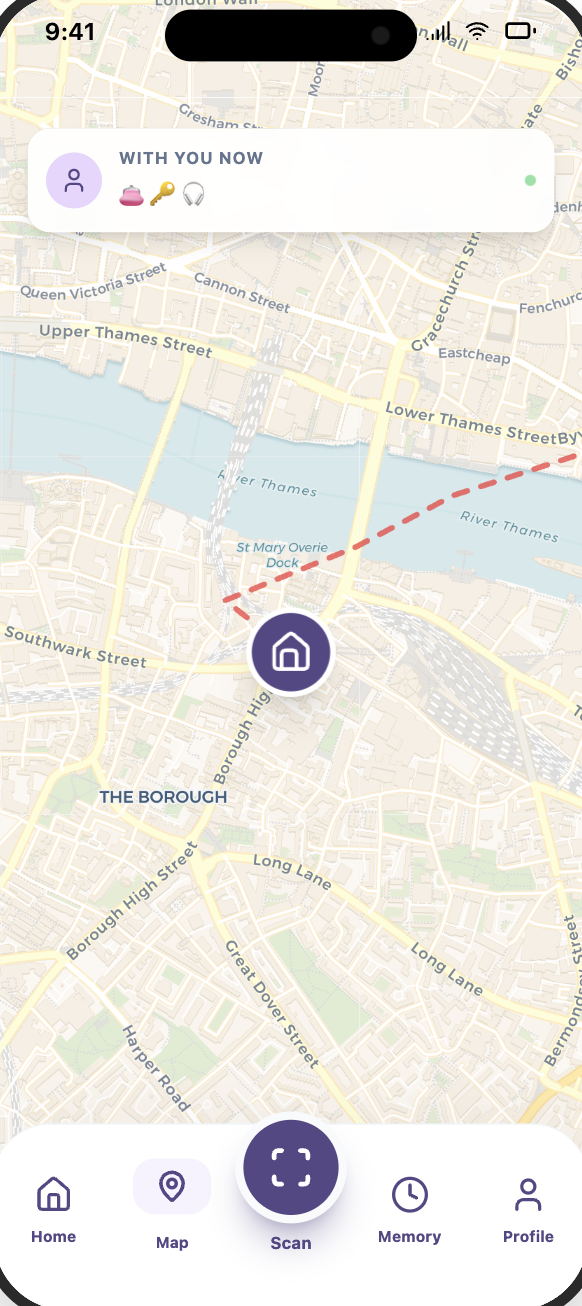
Map & Memory
Every scan writes to a spatial Map of where things live and a Memory timeline of when each was last seen — each entry backed by a photo.
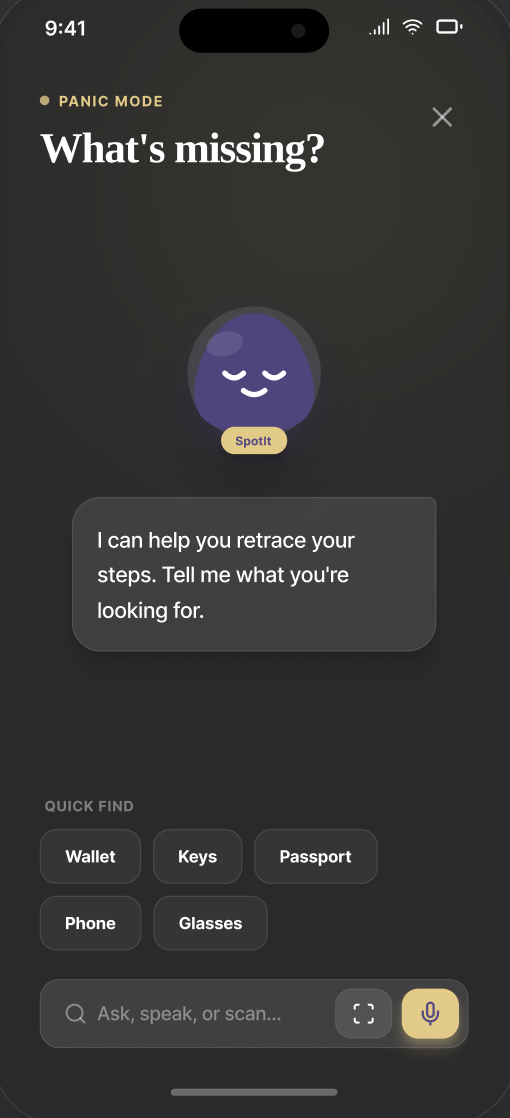
Panic Search
The fast path. A dedicated “Panic Mode” — ask, speak, or scan, with one-tap Quick Find chips for wallet, keys, passport — returns the last-seen location and a photo in milliseconds. A deliberately separate, no-friction flow for the worst moment.
Teach-it-once
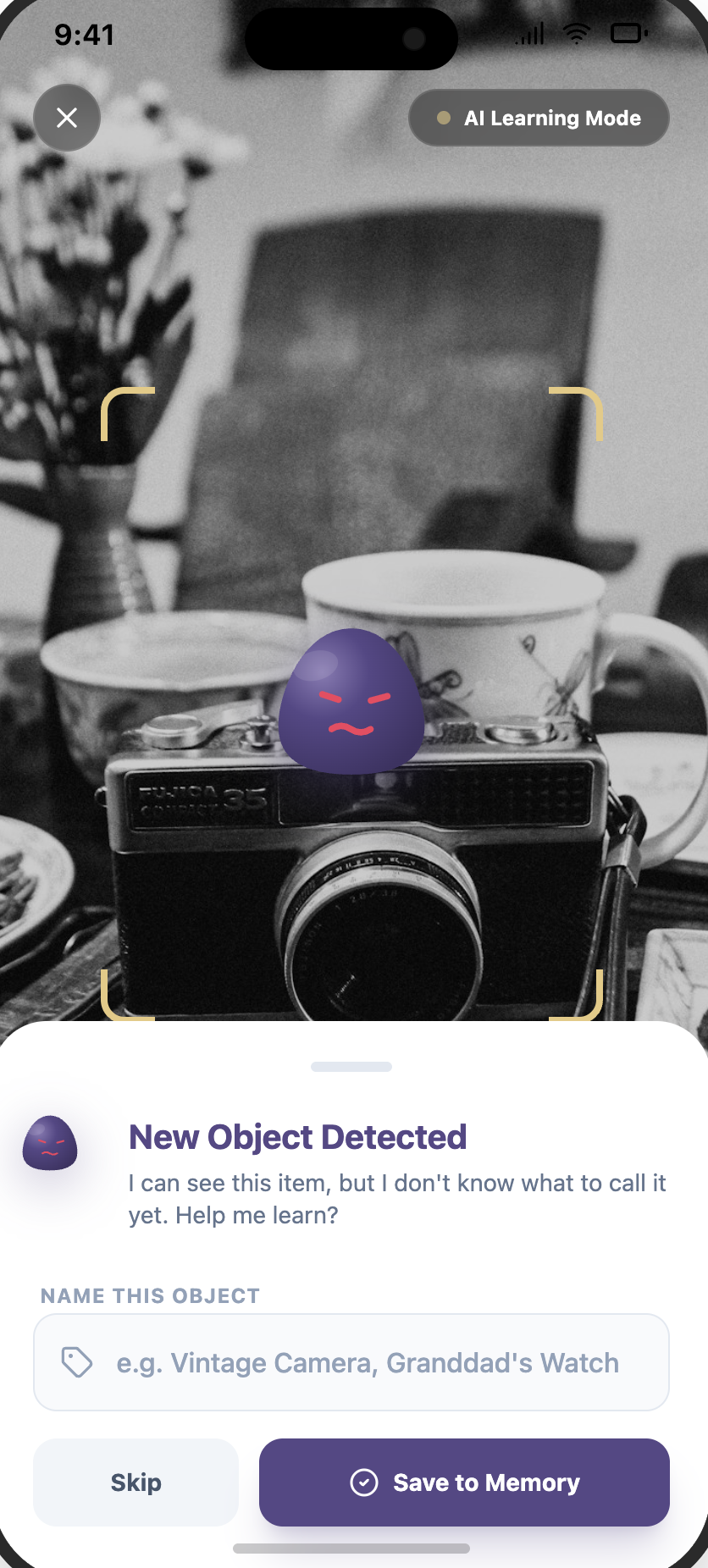
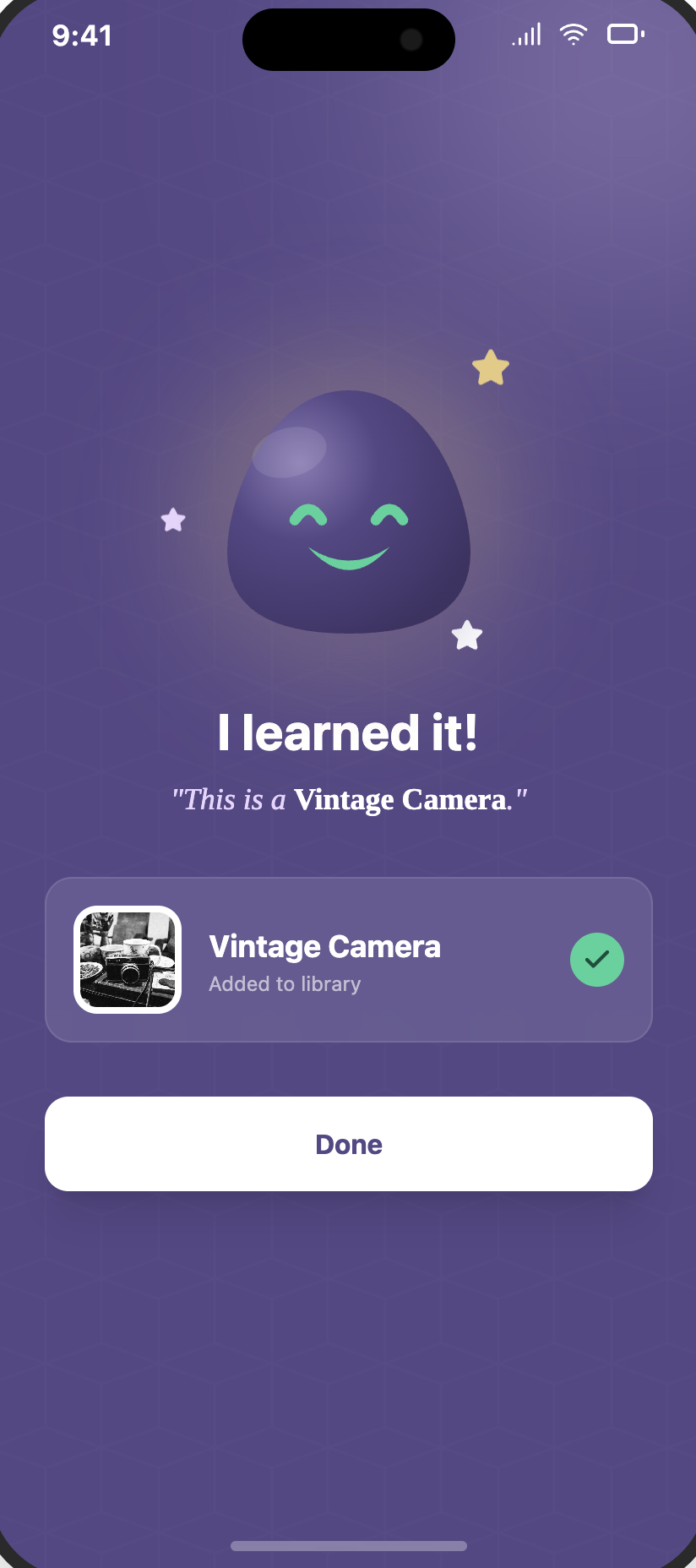
See something the model doesn't know? It flags the unknown object and asks you to name it — once. A CLIP embedding lets SpotIt recognize it next time, then confirms with a cheerful “I learned it.” No repetitive tagging, ever.
Under the hood
I designed it — then I built the backend too.
The most interesting design problems lived in the system, not just the screens. I built a FastAPI backend that does the heavy lifting across four stages.
Detect
Server-side YOLO11s. The phone uploads a frame; the backend returns bounding boxes fast. One consistent model for every device — improvable without an app update.
Remember
Detections are stored with 3D coordinates, timestamps, and cropped evidence photos in Supabase — so every “where” has proof.
Search
Two layers: a fast last-seen lookup for panic search, plus semantic (vector) + text search, so “where's my charger” still matches “phone cable.”
Reason
The part I'm proudest of: when search finds nothing useful, a Gemini reasoning service infers a likely location from your habits. The app never just says “I don't know” — it makes a smart guess.
9 SQL migrations, pgvector embeddings, indexed panic-search paths, and a test suite organized per ticket.
Design decisions
Three calls that shaped the product.
Server-side detection over on-device
On-device felt more “native,” but it meant inconsistent accuracy across phones, real battery drain, and shipping a whole new app to improve the model. Moving YOLO to the server bought one consistent model, lighter phones, and model upgrades without an app release. The UX cost — a network round-trip — I hid behind instant, optimistic feedback.
A separate “Panic Search” fast path
Searching your inventory and needing your passport in 90 seconds are different emotional states. So panic search is its own surface — one field, a last-seen answer, a photo — optimized purely for speed, not power. Calm browsing lives elsewhere.
Failure should reason, not shrug
The worst version of this app says “no results.” I designed the AI reasoning fallback so an empty search becomes an informed guess based on your habits. It turns the model's uncertainty into something genuinely helpful — and keeps the assurance promise even when memory fails.
What I learned
What I'd carry forward.
Designing and building it myself meant no intent was lost in handoff — but it also forced honest tradeoffs between the ideal flow and what the backend could actually return in a fraction of a second.
Owning the AI layer changed the design. Features like reasoning-on-failure only exist because I could see, directly, what the model could and couldn't do — design and engineering informing each other in the same head.
Next project
Travy